
Ford Ecosport: Information and Entertainment Systems / Information and Entertainment System - General Information
Ford Ecosport 2014-2026 Service and Repair Manual / Information and Entertainment Systems / Information and Entertainment System - General Information
- Description and Operation - Information and Entertainment System - Component Location
- Description and Operation - Information and Entertainment System - Overview
- Description and Operation - Information and Entertainment System - System Operation and Component Description
- Diagnosis and Testing - Information and Entertainment System
- General Procedures - Bezel Diagnostics
- General Procedures - Speaker Audio Test
- Removal and Installation - A-Pillar Tweeter Speaker
- Removal and Installation - Antenna Isolator Module
- Removal and Installation - Audio Front Control Module (ACM)
- Removal and Installation - Audio Unit Amplifier
- Removal and Installation - Audio Unit Antenna
- Removal and Installation - Audio Unit Antenna Cable
- Removal and Installation - Cellular Phone Antenna Cable
- Removal and Installation - FM2 Diversity Antenna Amplifier
- Removal and Installation - Front Controls Interface Module (FCIM)
- Removal and Installation - Front Display Interface Module (FDIM)
- Removal and Installation - Front Door Speaker
- Removal and Installation - Front Door Tweeter Speaker
- Removal and Installation - Instrument Panel Center Speaker
- Removal and Installation - Low Voltage Differential Signalling (LVDS) Cable
- Removal and Installation - Media Hub
- Removal and Installation - Microphone
- Removal and Installation - Rear Door Speaker
- Removal and Installation - Subwoofer Speaker
- Removal and Installation - SYNC Module [APIM]
- Removal and Installation - SYNC Module [APIM] to Universal Serial Bus (USB) Port Cable
- Removal and Installation - Telematics Control Unit (TCU) Module
- Removal and Installation - Telematics Control Unit (TCU) Module Antenna
- Removal and Installation - Telematics Control Unit (TCU) Module Antenna Coaxial Cable

 Description and Operation - Information and Entertainment System - Component Location
NOTE:
The available speaker configurations are shown first. The
remaining hidden audio and SYNC system components follow the speaker
configurations...
Other information:
Ford Ecosport 2014-2026 Service and Repair Manual: Specifications
Rear Parking Aid Item Specification Test object position 1 (P1) and position 5 (P5), distance from rear bumper 30 cm (12 in) Test object position 2 (P2) and position 4 (P4), distance from rear bumper 91 cm (36 in) Test object position 3 (P3), distance from rear bumper 170..
Ford Ecosport 2014-2026 Service and Repair Manual: Removal and Installation - Brake Pads
Special Tool(s) / General Equipment 206-005Retractor, Brake Caliper Piston Materials Name Specification Motorcraft® DOT 4 LV High Performance Motor Vehicle Brake FluidPM-20 WSS-M6C65-A2 Motorcraft® Metal Brake Parts CleanerPM-4-A, PM-4-B, APM-4-C - Removal NOTE: Removal steps in this procedure may contain installa..
Categories
- Manuals Home
- 2nd Gen Ford Ecosport Service Manual (2014 - 2026)
- Removal and Installation - Blower Motor
- General Procedures - Battery Charging
- General Procedures - Transmission Fluid Level Check
- Diagnosis and Testing - Body Control Module (BCM)
- Removal and Installation - Evaporative Emission Canister Purge Valve
Removal and Installation - Variable Camshaft Timing (VCT) Unit
Removal
NOTICE: During engine repair procedures, cleanliness is extremely important. Any foreign material, including any material created while cleaning gasket surfaces, that enters the oil passages, coolant passages or the oil pan can cause engine failure.
Remove the timing chain.Refer to: Timing Chain (303-01C Engine - 2.0L Duratec-HE (129kW/175PS), Removal and Installation).
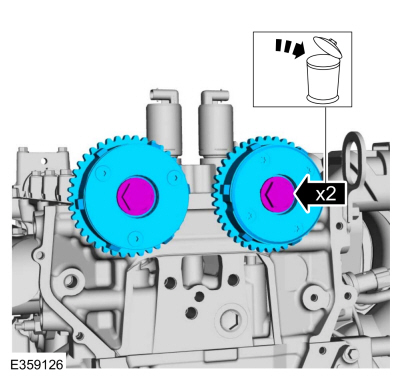
Remove the bolts and VCT units.
Discard the bolts.

Copyright © 2026 www.foecosport2.com